
WhatsApp Cloud API vs Traditional WhatsApp Business: What's the Difference?
Ananya Desai
Head of AI Research
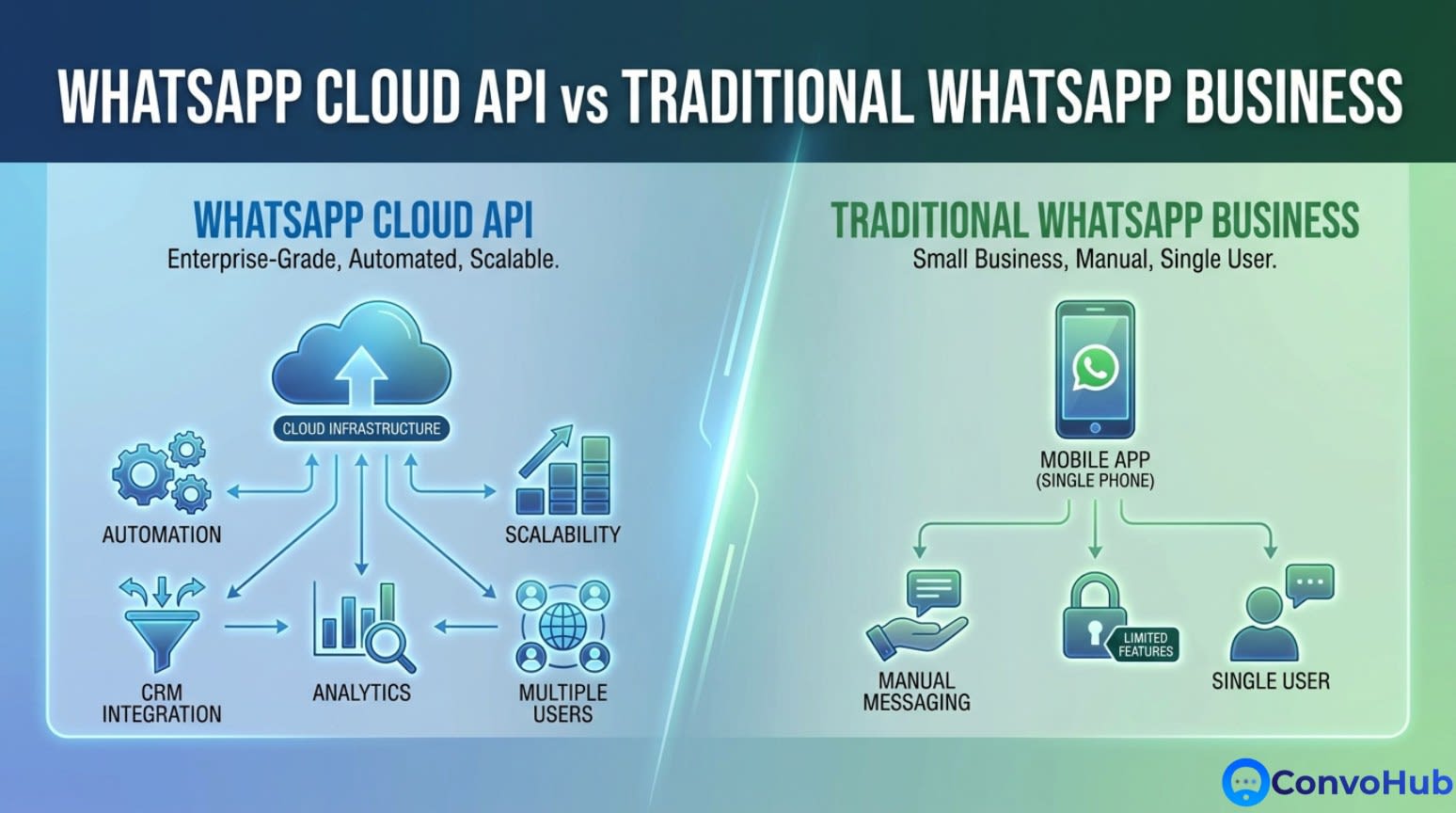
WhatsApp Cloud API vs Traditional WhatsApp Business: What's the Difference?
With over 2 billion active users worldwide, WhatsApp has become essential for business communication. But if you're exploring WhatsApp for your business, you've probably encountered two options: [WhatsApp](/whatsapp-crm-real-estate-dubai) Business App and [WhatsApp](/whatsapp-crm-real-estate-saudi-arabia) Cloud API (formerly WhatsApp Business API).
They sound similar, but they're designed for completely different use cases. Choosing the wrong one could limit your growth or waste resources.
Let's break down everything you need to know to make the right choice.
The Three WhatsApp Solutions for Business
First, let's clarify the three options available:
1. WhatsApp (Regular)
What it is: The standard WhatsApp app everyone uses for personal messaging.
For: Personal use only.
Not allowed for business - Using regular WhatsApp for business violates terms of service and can result in a ban.
2. WhatsApp Business App
What it is: Free mobile app designed for small businesses.
For: Solopreneurs and very small businesses with one person managing messages.
Download: Available on iOS and Android app stores.
3. WhatsApp Cloud API
What it is: Cloud-hosted API for medium to large businesses and developers.
For: Growing businesses, teams, and companies needing automation and integration.
Access: Requires approval and integration (can be done through platforms like ConvoHub).
WhatsApp Business App: Deep Dive
What You Get
The WhatsApp Business App is essentially WhatsApp with a few business-friendly features added:
Business Profile
- Business name and description
- Business category
- Address, email, and website
- Business hours
Messaging Tools
- Quick replies for common questions
- Greeting messages (auto-response when customers first contact you)
- Away messages (auto-response when you're unavailable)
- Labels to organize conversations (New customer, Paid, Order complete, etc.)
Product Catalog
- Showcase up to 500 products
- Include images, prices, and descriptions
- Share catalog links in chats
WhatsApp Web Support
- Use on desktop via web browser
- Still requires phone to be connected
Limitations
⚠️ Single device/user - Only one person can use the account at a time
⚠️ No automation - All responses are manual (except simple auto-replies)
⚠️ No integrations - Can't connect to your CRM, e-commerce platform, or other tools
⚠️ Manual management - No team inbox or assignment features
⚠️ Limited analytics - Basic message statistics only
⚠️ No [broadcast](/whatsapp-broadcast-ecommerce-india) lists for large audiences - Limited to 256 contacts per broadcast
⚠️ Requires phone connection - Phone must have internet connection
Best For
✅ Solo entrepreneurs
✅ Local shops and service providers
✅ Businesses with low message volume (<100/day)
✅ Simple customer communication needs
✅ Companies just testing WhatsApp for business
Pricing
FREE - No cost to use
WhatsApp Cloud API: Deep Dive
What You Get
The WhatsApp Cloud API is a completely different beast—it's a powerful platform for building custom business solutions.
Multi-User Access
- Entire team can access the same WhatsApp number
- Role-based permissions
- Team inbox with assignments
- Supervisor monitoring
Advanced Automation
- AI-powered chatbots
- Automated workflows and responses
- Trigger-based messaging
- Integration with business logic
Rich Features
- Interactive buttons and lists
- Media messaging (images, videos, documents, audio)
- Location sharing
- Contact card sharing
- Message templates for outbound messaging
Integrations
- Connect to CRM (Salesforce, HubSpot, etc.)
- E-commerce platforms (Shopify, WooCommerce, etc.)
- Custom applications via API
- Analytics and reporting tools
- Marketing automation platforms
Broadcasting & [Bulk Messaging](/blog/best-practices-for-bulk-messaging-compliance)
- Send to unlimited contacts
- Personalized mass messaging with templates
- Campaign management
- Segmentation capabilities
Analytics & Insights
- Detailed message metrics
- Response rates and times
- Conversation analytics
- Custom reporting
- Performance dashboards
Verified Business Badge
- Green checkmark for official business accounts
- Builds trust and credibility
- Displays business info in chat
Requirements
📋 Verified Facebook Business Manager account
📋 Phone number (dedicated number recommended, can't be used with regular WhatsApp)
📋 Technical setup (either in-house development or through a Business Solution Provider like ConvoHub)
📋 Message template approval (outbound messages must use pre-approved templates)
Best For
✅ Growing businesses with teams
✅ E-commerce stores
✅ Customer service departments
✅ Marketing and sales teams
✅ Businesses sending 100+ messages daily
✅ Companies needing automation and integrations
✅ Multi-location or franchise businesses
Pricing
Conversation-based pricing:
- Service conversations (customer initiates): 1,000 free conversations/month, then $0.005-0.081 per conversation (varies by country)
- Marketing conversations (business initiates): $0.007-0.135 per conversation (varies by country)
Note: A "conversation" is a 24-hour window of messaging, not individual messages.
Additional costs:
- Business Solution Provider fees (varies by provider)
- Development costs if building custom integration
Side-by-Side Comparison
| Feature | WhatsApp Business App | WhatsApp Cloud API |
|---|---|---|
| Cost | Free | Conversation-based pricing + provider fees |
| Users | 1 | Unlimited |
| Message Volume | Limited | Unlimited |
| Automation | Basic (quick replies only) | Advanced (full AI chatbots) |
| Integrations | None | Unlimited via API |
| Broadcasting | 256 contacts max | Unlimited with templates |
| Analytics | Basic stats | Advanced analytics |
| Support | Community forums | Business support + provider support |
| Verification Badge | No | Yes (green checkmark) |
| Setup Time | 5 minutes | Days to weeks |
| Technical Knowledge | None required | Required (or use provider) |
| Product Catalog | 500 products | Unlimited (via integration) |
| CRM Integration | No | Yes |
| Chatbot Capabilities | No | Yes |
| Team Collaboration | No | Yes |
| Custom Workflows | No | Yes |
| Reporting | Basic | Advanced |
Key Differences Explained
1. Messaging Limitations
WhatsApp Business App:
- Can only message customers who've messaged you first
- Broadcast lists limited to 256 contacts
- No message templates
WhatsApp Cloud API:
- Can send outbound messages using approved templates
- Unlimited broadcast audiences
- Pre-approved message templates for various use cases
2. The 24-Hour Window Rule
Both platforms have a 24-hour messaging window:
- Within 24 hours of customer's last message: Send any message
- After 24 hours: Can only send pre-approved message templates (Cloud API) or wait for customer to message again (Business App)
This rule exists to prevent spam and protect user experience.
3. Automation Capabilities
WhatsApp Business App:
```
Customer: "What are your hours?"
You: [manually type response or use quick reply]
```
Basic quick replies can speed this up, but you still need to manually trigger them.
WhatsApp Cloud API:
```
Customer: "What are your hours?"
Chatbot: [Automatically responds with hours, location, and booking link]
Chatbot: [Updates CRM with inquiry]
Chatbot: [Sends follow-up next day if no booking made]
```
Fully automated workflows based on complex logic.
4. Integration Examples
What you can do with Cloud API integrations:
E-commerce:
- Send order confirmations automatically
- Provide shipping updates
- Recover abandoned carts
- Process returns via chat
Appointment-based businesses:
- Send appointment reminders
- Allow booking via WhatsApp
- Send confirmation and rescheduling options
- Collect feedback post-appointment
[Customer support](/blog/roi-of-automated-customer-support):
- Integrate with helpdesk software
- Route conversations to right team member
- Track support tickets
- Analyze support performance
Sales & Marketing:
- Sync with CRM for lead management
- Send personalized campaigns
- Track conversion from WhatsApp
- Score leads based on engagement
Migration Path: When to Upgrade
Many businesses start with WhatsApp Business App and later migrate to Cloud API. Here are signs it's time to upgrade:
You're Ready for Cloud API When:
✅ You're overwhelmed with messages - Spending 4+ hours daily on WhatsApp
✅ You need team access - Multiple people need to handle customer conversations
✅ You're missing opportunities - Customers message outside business hours and you respond too late
✅ You're copying/pasting a lot - Answering the same questions repeatedly
✅ You need better organization - Difficult to track conversation status and follow-ups
✅ You want to send campaigns - Need to broadcast to more than 256 contacts
✅ You need integration - Want WhatsApp connected to your CRM, website, or e-commerce platform
✅ You're hiring support staff - Need multiple agents handling WhatsApp simultaneously
How to Get Started with Each
Getting Started with WhatsApp Business App
1. Download WhatsApp Business from app store
2. Verify your business phone number
3. Set up your business profile
4. Add quick replies for common questions
5. Set greeting and away messages
6. Create your product catalog (if applicable)
Time required: 30 minutes
Cost: $0
Getting Started with WhatsApp Cloud API
Option 1: DIY (for developers)
1. Create Facebook Business Manager account
2. Verify your business
3. Register for WhatsApp Cloud API access
4. Set up webhooks and integrate with your systems
5. Submit and get message templates approved
6. Build your chatbot and workflows
Time required: 2-8 weeks
Technical skill: High
Cost: Development time + conversation fees
Option 2: Use a Business Solution Provider (recommended)
Platforms like ConvoHub handle the technical setup and provide user-friendly interfaces:
1. Sign up with provider
2. Verify your business (provider guides you)
3. Connect your phone number
4. Use visual tools to build chatbots and workflows
5. Provider submits templates on your behalf
6. Go live in days, not weeks
Time required: 3-7 days
Technical skill: Low (no coding required)
Cost: Provider fees + conversation fees
Common Misconceptions
Myth #1: "WhatsApp Business App has everything I need"
Reality: It's great for very small businesses, but you'll outgrow it quickly if you're scaling. The lack of automation and team access becomes a bottleneck.
Myth #2: "WhatsApp Cloud API is too expensive"
Reality: When you factor in time savings and increased conversion, it usually pays for itself. Plus, the first 1,000 service conversations per month are free.
Myth #3: "I need developers to use Cloud API"
Reality: Not anymore. Platforms like ConvoHub provide no-code interfaces to build sophisticated WhatsApp experiences without writing a single line of code.
Myth #4: "I can just use both"
Reality: Each phone number can only be registered to one WhatsApp account. You must choose Business App OR Cloud API—not both on the same number.
Myth #5: "Cloud API is only for big companies"
Reality: Cloud API is increasingly accessible to businesses of all sizes. Even a solo entrepreneur handling 50+ daily messages benefits from automation.
Which Should You Choose?
Choose WhatsApp Business App If:
✅ You're a solo entrepreneur or very small team
✅ You handle fewer than 50 messages daily
✅ You don't need integrations with other tools
✅ You're just testing WhatsApp for business
✅ Your budget is extremely tight
✅ Your needs are very basic (contact info, quick replies)
Choose WhatsApp Cloud API If:
✅ You have (or plan to have) a team
✅ You handle 100+ messages daily
✅ You want to send marketing campaigns
✅ You need automation for efficiency
✅ You want to integrate with existing systems
✅ You're serious about customer experience
✅ You're scaling your business
Still Not Sure?
Ask yourself:
"In 12 months, will I still be the only person answering messages?"
If no → Cloud API
If yes → Business App (for now)
How ConvoHub Simplifies WhatsApp Cloud API
The WhatsApp Cloud API is powerful, but it can be complex. ConvoHub makes it accessible:
✅ No-Code Setup - Get started without developers
✅ Visual Workflow Builder - Create chatbots with drag-and-drop
✅ Pre-Built Templates - Start with proven message templates
✅ Team Inbox - Manage all conversations in one place
✅ Smart Routing - Automatically assign chats to the right team member
✅ Analytics Dashboard - Track performance and ROI
✅ Integrations - Connect to your existing tools easily
✅ Template Management - We help get your messages approved fast
✅ Training & Support - Get help when you need it
Real-World Example
Scenario: Mid-Sized E-commerce Business
Starting with WhatsApp Business App:
- Owner spends 4 hours/day answering questions
- Misses 40% of messages outside business hours
- Can't send order updates automatically
- Manual tracking in spreadsheets
- Zero integration with Shopify store
After switching to Cloud API (via ConvoHub):
- Chatbot handles 70% of common questions 24/7
- Automatic order confirmations and shipping updates
- Team of 3 agents manage inbox collaboratively
- Abandoned cart recovery campaigns (25% recovery rate)
- Full Shopify integration
- Reduced response time from 2 hours to 5 minutes
- Increased sales by 35% through WhatsApp channel
ROI: The automation and improved customer experience paid for the Cloud API within the first month.
Future-Proofing Your Choice
WhatsApp is continuously evolving its business offerings. Cloud API receives new features first:
Recent Cloud API additions:
- WhatsApp Flows (interactive forms and experiences)
- Enhanced payment capabilities
- Multi-product messages
- Order management features
- Advanced analytics
If you want to stay on the cutting edge of WhatsApp business features, Cloud API is the way to go.
Making the Switch
If you're currently using WhatsApp Business App and ready to upgrade:
⚠️ Important: You cannot migrate your existing WhatsApp Business App account to Cloud API. You'll need:
1. A new phone number, OR
2. To delete your Business App account and wait 30 days before registering that number with Cloud API
Migration tips:
- Inform customers of your new number
- Use status updates to announce the change
- Set up auto-reply on old number directing to new number
- Export important chat history before deleting
Conclusion
WhatsApp Business App and WhatsApp Cloud API serve different purposes:
- Business App is perfect for solopreneurs and very small businesses with basic needs
- Cloud API is essential for growing businesses that need automation, team collaboration, and integration
The good news? You don't have to figure out the technical complexity alone. Platforms like ConvoHub make Cloud API accessible to businesses of all sizes, providing enterprise-level WhatsApp capabilities without enterprise-level complexity or cost.
The question isn't whether to use [WhatsApp for](/whatsapp-for-healthcare) business—it's which version will help you grow faster.
*Ready to unlock the full power of WhatsApp Cloud API without the technical hassle? Discover how ConvoHub makes it easy to automate, integrate, and scale your WhatsApp business communication.*
Related Tools
- WhatsApp Business API Pricing Calculator — calculate Cloud API conversation costs by country and category
- Free WhatsApp Link Generator — create wa.me links to drive inbound messages and open more free 24-hour windows
- Free WhatsApp QR Code Generator — generate scannable QR codes that open a WhatsApp chat with your business instantly
Frequently Asked Questions
Related Articles

WhatsApp vs Email vs SMS for Business: Which Channel Wins?
WhatsApp, email, and SMS compared for business messaging — open rates, response times, costs, and when to use each. Data-backed guide for 2026.
How to Set Up WhatsApp Business API: Complete Step-by-Step Guide
Learn how to set up the WhatsApp Business API step by step — from creating a Meta Business Manager account to sending your first message. No developer required.

The Future of WhatsApp Business Automation
Discover how AI-powered automation is transforming WhatsApp business communication and what to expect in the coming years.